
You are currently browsing the category archive for the ‘EBOM’ category.
In my series of blog posts related to the (PLM) data model, I talked about Product, BOMs and Parts. This time I want to focus on the EBOM and (CAD) Documents relation. This topic became relevant with the introduction of 3D CAD.
Before companies were using 3D CAD systems, there was no discussion about EBOM or MBOM (to my knowledge). Engineering was producing drawings for manufacturing and not every company was using the mono-system (for each individual part a specifying drawing). Drawings were mainly made to assist production and making a drawing for an individual part was a waste of engineering time. Parametric drawings were used to specify similar parts. But now we are in the world of 3D!
 With the introduction of 3D CAD systems for the mainstream in the nineties (SolidWorks, Solid Edge, Inventor) there came a need for PDM systems managing the individual files from a CAD assembly. The PDM system was necessary to manage all the file versions. Companies that were designing simple products sometimes remained working file-based, introducing the complexity of how to name a file and how to deal with revisions. Ten years ago I was investigating data management for the lower tiers of the automotive supply chain. At that time still 60 % of the suppliers were using CATIA were working file-based. Data management was considered as an extra complexity still file version control was a big pain.
This has changed for several reasons:
- More and more OEMs were pushing for more quality control of the design data (read PDM)
- Products became more modular, which means assemblies can be used as subassemblies in other products, pushing the need for where used control
- Products are becoming more complex and managing only mechanical CAD files is not enough anymore – Electronics & Software – mechatronics – became part of the product
Most PDM systems at that time (I worked with SmarTeam) were saving the 3D CAD structure as a quantity-based document structure, resembling a lot a structure called the EBOM.
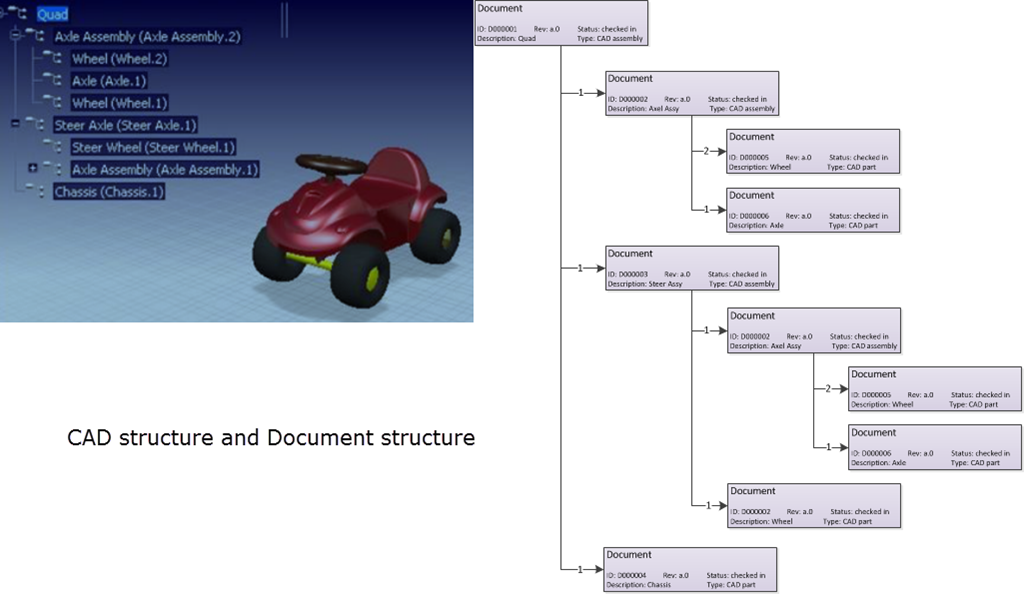
This is one of the most common mistakes made in PLM implementations.
The CAD structure does not represent the EBOM !!!
Implementers started to build all kind of customizations to create automatically from the CAD structure a Part structure, the EBOM. Usually these customizations ended up as a mission impossible, in particular when customers started to ask for bidirectional synchronization. They expected that when a Part is removed in the EBOM, it would be deleted in the CAD assembly too.
And then there was the issue that companies believed the CAD Part ID should be equal to the Part ID. This might be possible for a particular type of design parts, but does not function anymore with flexible parts, such as a tube or a spring. When this Part is modeled in a different position, it created a different CAD Document, breaking the one-to-one relation.
Finally another common mistake that I have seen in many PDM implementations is the addition of glue, paint and other manufacturing type of parts to the CAD model, to be able to generate a BOM directly from the CAD.
 From the data model perspective it is more important to understand that Parts and CAD documents are different type of objects. In particular if you want to build a PLM implementation where data is shared across all disciplines. For a PDM implementation I care less about the data model as the implementation is often not targeting enterprise continuity of data but only engineering needs.
A CAD Document (Assembly / Part / Drawing / …) behaves like a Document. It can be checked-in and checked out any time a change is made inside the file. A check-in operation would create a new version of the CAD Document (in case you want to trace the history of changes).
Meanwhile the Part specified by the CAD Document does not change in version when the CAD Document is changed. Parts usually do not have versions; they remain in the same revision as long as the specifying CAD Document matures.
Moving from PDM to PLM
For a PLM implementation it is important to think “Part-driven” which means from an initial EBOM, representing the engineering specification of the Product, maturing the EBOM with more and more design specification data. Design specification data can be mechanical assemblies and parts, but also electrical parts. The EBOM from a PCB might come from the Electrical Design Application as in the mechanical model you will not create every component in 3D.
And once the Electrical components are part of the EBOM, also the part definition of embedded software can be added to the BOM. For example if software is needed uploaded in flash memory chips. By adding electrical and software components to the EBOM, the company gets a full overview of the design maturity of ALL disciplines involved.
The diagram below shows how an EBOM and its related Documents could look like:

This data model contains a lot of details:
- As discussed in my previous post – for the outside world (the customer) there is a product defined without revision
- Related to the Product there is an EBOM (Part assembly) simplified as a housing (a mechanical assembly), a connector (a mechanical art) and a PCB (a mechanical representation). All these parts behave like Mechanical Parts; they have a revision and status.
- The PCB has a second representation based on an electrical schema, which has only (for simplification) two electrical parts, a resistor and a memory chip. As you can see these components are standard purchasable parts, they do not have a revision as they are not designed.
- The Electrical Part Flash Memory has a relation to a Software Part which is defined by Object Code (a zip-file?) which of course is specified by a software specification (not in the diagram). The software object code has a version, as most of the time software is version managed, as it does not follow the classical rules of mechanical design.
Again I reached my 1000 words, a sign to stop explaining this topic. For sure there are a lot of details to explain to this data model part too.
Most important:
- A CAD structure is not an EBOM (it can be used to generate a part of the EBOM)
- CAD documents and EBOM parts have a different behavior. CAD documents have versions, Parts do not have versions (most of the time
- The EBOM is the place where all disciplines synchronize their data, providing during the development phase a single view of the design status.
Let me know if this was to abstract and feel free to ask questions. Important for this series of blog post is to provide a methodology baseline for a real PLM data model.
I am looking forward to your questions or remarks to spark up the discussion.
 In my previous post, BOM for Dummies related to Configure To Order, I promised to come back on the special relation between the items in the BOM and the CAD data. I noticed from several posts in PLM and PDM groups that also the importance of CAD data is perceived in a different manner, depending on the background of the people or the systems they are experienced with.
So I would like to start with some general statements based on these observations.
 People who are talking about the importance of CAD data and product structures are usually coming from a background in PDM. In an environment where products are designed, the focus is around data creation, mostly CAD data. The language around parts in the BOM is mostly targeting design parts. So in a PDM environment CAD data is an important topic – therefore PDM people and companies will talk about CAD data and vaults as the center of information.
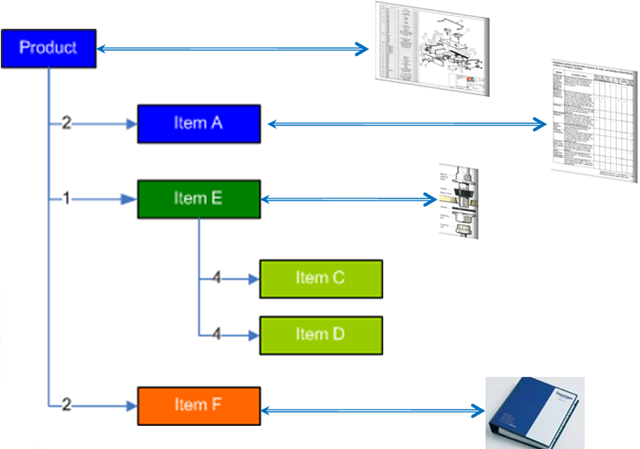
When you are working in a PLM environment, you need a way to communicate around a product, through its whole lifecycle, not only the design phase but also supporting manufacturing phases, the possible changes of an existing product through engineering changes, the traceability of as-built data and more. In a PLM environment, people have the physical part (often called the ERP part) in mind, when they talk about a part number.
As PLM covers product information across various departments and disciplines, the information carrier for product information cannot be the CAD data. The BOM, usually the mBOM, is the main structure used to represent and produce the product. Most parts in the mBOM have a relation to a CAD document (in many companies still the 2D drawing). Therefore PLM people and companies understanding PLM will talk about items and products and their lifecycle as their center of information.
CAD data in relation to Engineering to Order
The above generalizations have to be combined with the different main business processes. In a strict Engineering To Order environment, where you design and build a solution only once for a specific customer, there is no big benefit of going through an eBOM and mBOM transition.
During the design process the engineer already has manufacturing in mind, which will be reflected in the CAD structure they build – sometime hybrid representing both engineering and manufacturing items. In such an environment CAD data is leading to build a BOM structure.
And in cases where engineering is done in one single 3D CAD system, the company might use the PDM system from this vendor to manage their Bill of Materials. The advantage of this approach is that PDM is smoothly integrated with the design environment. However it restricts in a certain matter the future as we will see in further reading.
 Not everyone needs the Engineering to Order process !
Moving to an integrated, multi-disciplinary engineering process or changing the main process from Engineering To Order to Built To Order / Configure To Order will cause major challenges in the company.
I have seen in the recent past, several companies that would like to change their way of working from a CAD centric Engineering To Order process towards a more Built to Order or Configure To Order process. The bottle neck of making this switch was every time that engineering people think in CAD structures and all knowledge is embedded in the CAD data. They now want to configure their products in the CAD system.
For Configure to Order you have to look at a different way to your CAD data:
Questions to ask yourself as a company are:
- When I configure my products around a CAD structure, what should I do with data from other disciplines (Electrical/Tooling/Supplier data) ?
- When I upgrade my 3D CAD system to a new version, do I need to convert all old CAD data to the newest versions in order to keep my configurations alive?
- When configuring a new customer solution, do I need to build my whole product in CAD in order to assure it is complete?
- In Configure to Order the engineering BOM and manufacturing BOM are different. Does this mean that when I go through a new customer order, all CAD data need to be handled, going through eBOM and mBOM transition again?
For me it is obvious that only in an Engineering to Order environment the CAD data are leading for order fulfillment. In all other typical processes, BTO (Built to Order), CTO (Configure to Order) and MTS (Make to Stock), product configuration and definition is done around items and the CAD data is important associated data for the product definition and manufacturing
In the case of order fulfillment in a Configure to Order process, the CAD structure is not touched as configuration of the product is available based on items. Each item in the mBOM has it relations to CAD data or other specifying information.
In the case of Built To Order, a huge part of the product is already configured, like in Configure To Order. Only new interfaces or functionality will go through a CAD design process. This new design might be released through a process with an eBOM to mBOM transition. In cases where the impact or the amount of data created in engineering is not huge, it is even possible to configure the changes immediately in an mBOM environment.
 A second point, which is also under a lot of discussion in the field ( PLM interest groups), is that PDM is easily to introduce as a departmental solution. The engineering BOM is forwarded to manufacturing and there further (disconnected) processed. The step from PDM to PLM is always a business change.
When PDM vendors talk about ERP integration, they often mean the technical solution of connecting the two systems, not integrating the processes around the BOM (eBOM/mBOM transition) 0r an integrated engineering change (ECR/ECO). See how easy it is according to some PDM vendors:
or
PLM requires an adaptation of all departments to work different and together around a single product definition. Especially in a mid-market company, this is a big issue, as all product knowledge is stored in the CAD data and the knowledge how to produce the product is stored in the mBOM on the ERP side. These environments are often disconnected.
Conclusion: In the context of PDM the importance of CAD data is clear and for companies following a strict Engineering To Order process the main source of product knowledge. Companies following the Built To Order / Configure To Order process should configure their products around items to keep flexibility towards the future.
Companies with the intention to move to Built To Order or Configure To Order should not invest too much in CAD data configuration as it creates a roadblock for the future.
In my next post I will address the question that comes up from many directions, addressed by Jim Brown and others, as discussed in one of his recent posts around a PLM standard definition and more ….
 This is the third post on Bill of Material handling for different types of companies, this time the focus on Configure To Order (CTO). In the CTO process, products are assembled and configured based on customer requirements. This means there is no more engineering needed when customer requirements are known. CTO examples are, the ordering process of a car with all its options, or ordering a personal computer over the internet.
So what has Configure To Order to do with PLM as there is no engineering?
The main PLM activity takes places when designing the configurable product. Designing a product that is configurable, requires a complete different approach as compared to Engineering to Order or Build to Order. Although we see a similar Configure to Order activity in the R&D departments of companies that follow the Build to Order process. They are also designing products or modules that can be used as-is in customer specific orders as part of the solution.
 The challenge of CTO is to design products that are modular, and where options and variants are designed on a common platform with common interfaces. If you look to the dashboard of a car you will see placeholders for additional options (in case you have the minimal car version) and also you might see that for example the radio display in a basic car version differs from the complete board computer in the luxury version. The common platform is one dashboard, fitting to numerous options.
An engineering department will not focus on designing and defining each of the possible combinations of options as this would be impossible to manage. What can be managed is the common platform (the baseline) and all different options on top of this baseline.
So what happens with the BOM?
The initial design of configurable products goes through similar steps as the BTO process, which means starting from a conceptual BOM, moving to an Engineering BOM (eBOM) and finally produce a BOM for manufacturing (mBOM). The difference is that in the CTO process the mBOM is not developed for just one product, but contains all definitions for all possible products. In this situation we talk about a generic mBOM.
Only when a customer order exists, the generic mBOM is resolved into a specific mBOM for this customer order, which then can be sent to the ERP system for execution.
 In a generic BOM the relations are managed by filters. These filters define the effectivity of the link, in simple words if the relation between two parts in the BOM is valid (and shown) or not. There are various ways to define effectivity – with again a differentiation in usage
- revision based effectivity – which means the relation between two items is valid in case the revisions match
- date effectivity – which means the relation is valid during a certain time interval
Both methods are used most of the time for non-configurable products. The revision and date effectivity are used to be able to track the product history through time and therefore to have full traceability. But this does not work if you want to configure every time a customer specific order.
In that case we use unit or option based filtering.
- unit effectivity – which means the relation between two items is valid for a unit (or a range of units) produced. For example a batch of products or a unique product with a serial number
- option effectivity – which means the relation between two items is valid in case a certain condition is valid. Which condition depends on the configuration rules for this option. Example of options are: color, version, country
It is clear that unit and option based filtering of a BOM can lead to a conceptual complex product definition which goes beyond the BOM for Dummies target. Below an illustration of the various filter concepts (oops the animated gif does not work – i will investigate):

The benefit of this filtering approach is that there is a minimum of redundancy of data to manage. This makes it a common practice in the aerospace and automotive industry. An example describing all the complexity can be found for example here, but I am sure on this level there are enough publications and studies available.
And what about the CAD ?
I will write a separate post on this topic, as all the possible interactions and use cases with CAD are a topic on its own. You can imagine, having the 3D virtual world combined with a configurable BOM brings a lot of benefits
What PLM functions are required to support Configure to Order ?
- Project management – not so much focus here as the delivery project for a customer does not require much customer interaction. Of course, the product development processes requires advanced capabilities which I will address later in a future post.
- Document management – same approach as for project management. The product related documentation needs to exist and secured. Customer specific documentation can be generated often automatically.
- Product Management – managing all released and available components for a solution, related to their Bill of Materials. Often part of product management is the classification of product families and its related modules
- Item management – The main activities here are in the mBOM area. Capabilities for BOM generation (eBOM/mBOM), baseline and compare using filtering (unit based / option based) in order to support the definition if the manufactured product
- Workflow processes – As we are dealing with standardized components in the BOM, the Engineering Change Request (ECR) and Engineering Change Order (ECO) processes will be the core for changes. And as we want to manage controlled manufacturing definition, the Manufacturer Change Order process and Standard Item Approval process are often implemented
Optional:
- Requirements Management – specially for complex products, tracking of individual requirements and their implementation, can save time and costs during delivery to understand and handle the complex platform
- Service Management – as an extension of item management. When a customer specific order has been delivered it might be still interesting for the company that delivered the product to keep traceability of the customer configuration for service options – managing the Service and As-Built BOM
- Product Configurator – the reason I write it as optional, is because the target is order execution, which is not a PLM role anymore. The ERP system should be able to resolve the full mBOM for an order. The PLM product configuration definition is done through Product and Item management. Depending on the customer environment the role of configurator might be found in PLM in case ERP does not have the adequate tools.
Conclusion:
It is hard to describe the Configure To Order process in the scope of BOM for Dummies. As various detailed concepts exist per industry there is no generic standard. This is often the area where the PLM system, the PLM users and implementers are challenged the most: to make it workable, understandable and maintainable
Next time some industry specific observations for a change
 Continuing the posts on Bill of Material handling for different types of companies, this time the focus on BOM handling in a Build to Order process. When we are talking about Build to Order process, we mean that the company is delivering solutions for its customers, based on existing components or modules. A typical example is the food processing industry. In order to deliver a solution, a range of machinery (ingredient manipulation) and transporting systems are required. The engineering tasks are focused on integrating these existing components. In many cases new or adjusted components are required to complete the solution.
Research and Development in a BTO company
In a typical BTO company you see actually two processes.
- The main BTO process, fulfilling the needs for the customers based on existing components
- An R&D department, which explores new technologies and develops new components or modules, which will become available for selling to new customers.
 This is the innovation engine of the company and often can be found in a complete isolated environment – extra security – no visibility for other departments till release. The task for this R&D department is to develop machinery or modules based on new, competitive technologies, which are rapidly configurable and can be used in various customer solutions. The more these machines or modules are configurable, the better the company can respond to demands from customers, assuming a generic machine and interfaces does not degrade performance, compared to optimal tuned machinery.
I will describe the BOM handling for this department in a future post, as also here you will see particular differences with the ETO and BTO BOM handling.
Back to the core of BTO
I found a nice picture from 2003 published by Dassault Systems describing the BTO process:

We see here the Bidding phase where a conceptual BOM is going to be defined for costing. Different from the ETO process, the bidding company will try to use as much as possible known components or technology. The reason is clear: it reduces the risk and uncertainties, which allow the bidding company to make a more accurate and competitive cost estimate for these parts. When a company becomes mature in this area, a product configurator can be used to quantify the estimated costs.
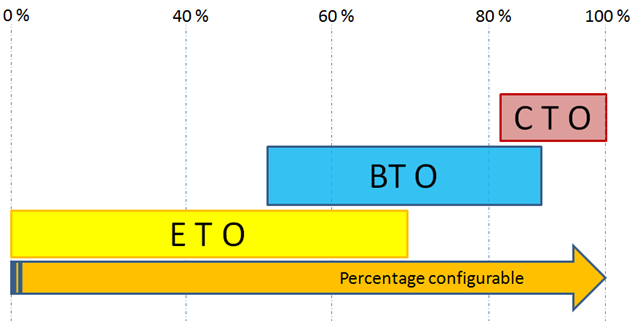
The result from the bidding phase is a conceptual BOM, where hopefully 60 % or more is already resolved. Now depending on the amount of reuse, the discussion comes up: Should modifications being initiated from the eBOM or from the mBOM?
In case of 60 % reuse, it is likely that engineering will start working around the eBOM and from there complete the mBOM. Depending on the type of solution, the company might decide to handle the remaining 40 % engineering work as project unique and treat it the same way as in an ETO process. This means no big focus on the mBOM as we are going to produce it only once.
I have worked with companies, which tried to analyze the 40 % customer specific engineering per order and from there worked towards more generic solutions for future orders. This would mean that a year later the same type of order would now be defined for perhaps 80 %. Many companies try to change themselves from a project centric company towards a product centric company, delivering configured products through projects.
Of course when solutions become 100 % configurable, we do not speak from BTO anymore, but from Configure to Order (CTO). No engineering is needed; all components and interfaces are designed to work together in certain conditions without further engineering. As an example, when you buy a car or you order a PC through the internet – it is done without sales engineering – it is clearly defined which options are available and in which relation.
See below:
However the higher the amount of reuse, the more important it becomes to work towards an mBOM, which we will than push the order to ERP.
And this is the area where most of the discussions are in a PLM implementation.
- Are we going to work based on the mBOM and handle all required engineering modifications from there?
Or
- Do we first work on a complete eBOM and once completed, we will complete the mBOM?
The reuse from existing components and modules (hardware) is one of the main characteristics of BTO. Compare this to ETO where the reuse of knowledge is the target no reuse of components.
The animation shows the high level process that I discussed in this post.
What PLM functions are required to support Build to Order ?
- Project management – the ability to handle data in the context of project. Depending on the type of industry extended with advanced security rules for project access
- Document management – where possible integrated with the authoring applications to avoid data be managed outside the PLM system and double data entry
- Product Management – managing all released and available components for a solution, related to their Bill of Materials. Often part of product management is the classification of product families and its related modules
- Item management – The main activities here are in the mBOM area. As items in a BTO environment are reused, it is important to provide relevant ERP information in the PLM environment. Relevant ERP information is mostly actual costs, usage information (when was it used for the last time) and availability parameters (throughput time / warehouse info).
As historically most of the mBOM handling is done in ERP, companies might not be aware of this need. However they will battle with the connection between the eBOM in PLM and the mBOM (see many of my previous posts).
As part of the BTO process is around engineering, an EBOM environment with connections to specifying documents is needed. This requires that the PLM system has eBOM/mBOM compare capabilities and an easy way to integrate engineering changes in an existing mBOM.
- Workflow processes – As we are dealing with standardized components in the BOM, the Engineering Change Request (ECR) and Engineering Change Order (ECO) processes will be the core for changes. In addition you will find a Bidding Process, a Release process for the customer order, Manufacturer Change Order process and a Standard Item Approval process.
Optional:
- A Sales Configurator allowing the sales engineering people to quickly build the first BOM for costing. Working with a Sales Configurator requires a mature product rationalization.
- Supplier Exchange data management – as many BTO companies work with partners and suppliers
- Service Management – as an extension of item management. Often in this industry the company who Builds the solutions provides maintenance services and for that reason requires another Bill of Material, the service BOM, containing all components needed when revising a part of the machine
- Issues Management – handling issues in the context of PLM gives a much better environment for a learning organization
- Requirements Management – specially for complex products, tracking of individual requirements and their implementation, can save time and costs during delivery
Conclusion (so far):
When you compare these PLM requirements with the previous post around ETO, you will discover a lot of similarities. The big difference however is HOW you use them. Here consultancy might be required as I do not believe that by having just functionality a company in the mid-market will have time to learn and understand the special tweaks for their business processes.
Next post more on configurable products
 This time a few theoretical posts about BOM handling, how the BOM is used in different processes as Engineering To Order (ETO), Make To Order (MTO) and Build To Order (BTO) organizations and finally which PLM functions you would expect to support these best practices.
I noticed from various lectures I gave, from the search hits to my blog and from discussions in forums that there is a need for this theoretical base. I will try to stay away from too many academic terminologies, so let’s call it BOM for Dummies.
Note: All information is highly generalized to keep is simple. I am sure in most of the companies where the described processes take place more complexity exists.
What is a BOM?
A BOM, abbreviation for Bill of Materials, is a structured, often multi-level list of entities and sub-entities used to define a product
I keep the terminology vague as it all depends to who is your audience. In general when you speak with people in a company that does engineering and manufacturing, you have two major groups:
- The majority will talk about the manufacturing BOM (mBOM), which is a structure that contains the materials needed to manufacture a product in a certain order.
We will go more in depth into the mBOM later. - When you speak with the designers in a company they will talk about the eBOM, which is a structure that contains the components needed to define a product.
Both audiences will talk about ‘the BOM’ and ‘parts’ in the BOM, without specifying the context (engineering or manufacturing). So it is up to you to understand their context.
Beside these two major types of BOMs you will find some other types, like Conceptual BOM, Customer Specific BOM, Service BOM, Purchase BOM, Shipping BOM.
Each BOM is representing the same product only from a different usage point of view
The BOM in an Engineering To Order company
In an Engineering to Order company, a product is going to be developed based on requirements and specifications. These requirements lead to functions and systems to be implemented. For complex products companies are using systems engineering as a discipline, which is a very structured approach that guarantees the system you develop is matching all requirements and these requirements have been validated.
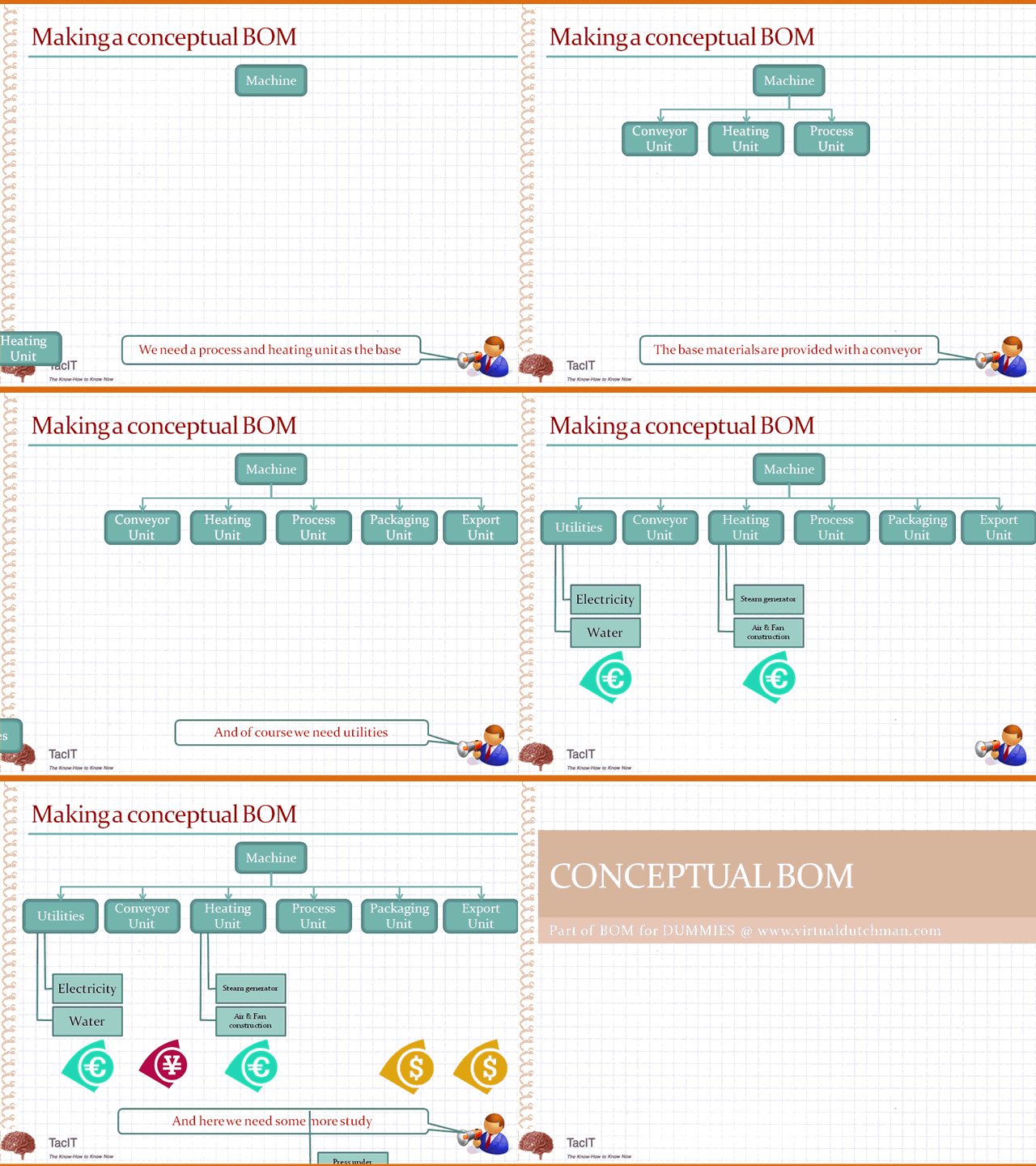
In less complex and less automated environments, you will see that the systems engineering is done in the head of the experienced engineers. Based on the requirements, they recognize solutions that have been done before and they build a first conceptual structure to describe the product. This is a conceptual BOM, often only a few levels deep, and this BOM is mainly used for costing and planning the work to be done.
A conceptual BOM could like this (open the picture in a separate window to see the animation)
Depending of the type of engineering company, they are looking for the reuse of functions or systems. The reuse of functions means that you manage your company’s Intellectual Property (IP) where the reuse of systems can be considered as the reuse of standard building blocks (modules) to build a product. The advantage of system reuse of course is the lower risk, as the system has been designed and built and tested before.
From the conceptual BOM different disciplines start to work and design the systems and their interfaces. This structure could be named the eBOM as it represents the engineering point of view from the product. In Engineering to Order companies there is a big variation on how to follow up after engineering. Some companies only specify how the product should be made, which materials to use and how to assemble them. The real manufacturing of the product is in that case done somewhere else, for example at the customer site. Other companies still do the full process from engineering and manufacturing.
As there is usually no reuse of the designed products, there is also no investment in standardizing items and optimizing the manufacturing of the product. The eBOM is entered in the ERP system and there further processed to manufacture the product. A best practice in this type of environments is the approach that the eBOM is not a 100 % pure the eBOM, also items and steps needed for manufacturing might be added by the engineers as it is their responsibility to specify everything for manufacturing without actually making the product.
This animation shows on high level the process that I described (open the link in a separate window to see the animation)

What PLM functions are required to support Engineering To Order
The following core functions apply to this process:
- Project management – the ability to handle data in the context of project. Depending on the type of industry extended with advanced security rules for project access
- Document management – where possible integrated with the authoring applications to avoid data be managed outside the PLM system and double data entry
- Classification of functions and/or systems in order to have an overview of existing IP (what have we done) and to promote reuse of it
- Item management – to support the eBOM and its related documentation. Also the items go through a lifecycle representing its maturity:
– The eBOM might be derived from the mechanical 3D CAD structure and further extended from there.
– For design reviews it would be useful to have the capability to create baselines of the eBOM including its specifying documents and have the option to compare baselines to analyze progress
– The completed eBOM would be transferred to the ERP system(s). In case of a loose ERP connection a generic XML export would be useful (or export to Excel as most companies do) - Workflow processes – to guarantee a repeatable, measurable throughput of information – both approval and change processes
Optional:
- Supplier Exchange data management – as many ETO companies work with partners and suppliers
- Issues Management – handling issues in the context of PLM gives a much better environment for a learning organization
- Requirements Management – specially for complex products, tracking of individual requirements and their implementation, can save time and costs during delivery
- A configurator allowing the sales engineering people to quickly build the first conceptual BOM based on know modules combined with engineering estimates. This is the base for a better controlled bidding / costing
Let me know if this kind of posts make sense for you …..
Next time we will look at the BOM in a Build To Order process
 After two posts on objections for PLM, I want to come back to the basics around connecting PLM and ERP systems. Most of the people are enjoying their holiday at this moment and for that reason I have the time to complete the PLM and ERP story. I guess, for a company in the mid-market, it is hard to decide which approach to follow.
ERP vendors will claim that by managing items and relations to the design documents, they are able to provide an environment that supports engineering on top of their system. For mid-market companies this might be the ‘cheapest’ option – buy or get your solution from a single vendor. Especially when the ERP vendor provides the PLM module for free. And this is exactly one of the reasons why it will fail. When no PLM knowledge or best practices are provided to the company, but just a set of function and features, how would these companies know how to implement PLM ?
If you give a module for free it obviously also shows you do not understand the value of it.
My two last posts with the common title 5 reasons not to implement PLM are addressing some of these issues.
But now back to the PLM and ERP connection. In my two previous posts, I described how would be shared between a PLM and an ERP system, combined with issues as: intelligent part-numbers and classification. You will find similar discussions on the manufacturing center.
The connection between PLM and ERP has little value in case only items are exchanged. Of course engineering can have the benefit of early visibility of item logistical data, like costs, stock and status. But the real value comes when engineering, through the PLM environment, feeds the ERP system with the definition of how to manufacture a product. The way to manufacture a product is based on the MBOM (Manufacturing Bill of Materials), combined with operations that need to be performed on the items in the BOM.
In my post Where is the MBOM I already discussed the classical challenge many companies are facing. Historically they enter all the data for manufacturing in their ERP system, as this was the first system driving production. The input for the ERP system came from the engineering department, sometimes provided as Excel sheet or in case of more automation with the CAD environment as an EBOM (Engineering Bill of Material)
As the concept of connection CAD through PLM with ERP might be new for many companies, I will describe below some ‘bad practices’ that I found in past implementations and what we can learn from them.
Bad practice 1: A CAD file equals and Item number
As PLM is often introduced starting from the design department, the initial thought to connect CAD files and Items is based on the simple rule: “Every CAD file represents an item number”. In the ‘good old’ 2D world this might have been true, as in the ERP system, related to each item to be manufactured a drawing existed.
However in the 3D world this approach leads to the following problems:
- Flexible parts like rubber tubes or belts have a different file representations when used in a different position. This means for one item number several CAD files may exist.
- Some CAD systems like CATIA, SolidWorks allow the designer to store within one file different configurations of a design, as they share a common design but vary on some specific points. Each variation of course is a different item number. This means for one CAD file several item numbers may exists.
The conclusion from the above exceptions is:
- Handle CAD files and Item numbers as separate entities in your PLM system
- A CAD file CAN NOT BE equal to an Item Number
Bad practice 2: The CAD structure can be used as the BOM to be send to ERP
As in many companies the EBOM and the MBOM resemble a lot, the temptation exists to push the engineer instead of defining a design in the concept of the EBOM, to work in a mixed environment.
This approach will lead to the following problems:
- Drawing of non-design items in the 3D CAD assembly as they are needed to represent an item. For example a paint-can symbol, an oil-can, etc. As these materials are needed for manufacturing, the designer has to add them to the product structure as in this way they will appear in the BOM. This approach leads to a dependency on the CAD assembly that is not needed. Imagine another type of paint is needed – this would require the designer to change the CAD assembly files as they represent the manufacturing structure – or you do not update the CAD assembly files and in that case you have no reliable data anymore.
- The designer might use in the design subassemblies that group two or more items logically together. For example a bolt, a nut and two rivets. As the subassembly does not exist as an item number in the ERP system, the ERP system treats this assembly as a phantom assembly. No operations needed, but an extra intermediate step is defined in the ERP system, as-if for each usage the bolt, the nut and rivets need to be assembled.
The conclusion from the above points is:
- Handling the MBOM in the CAD system to send it automatically to ERP leads to complexity either in the design environment or in the ERP system
- There is no need to have this complexity when the concept of EBOM and MBOM is implemented in PLM
- Handling EBOM/MBOM transformation in the interface leads to costly complexity, see Where is the MBOM ?
Bad practice 3: The Items in CAD structure are tightly linked to the MBOM
This practice often appears in combination with the two bad practices above. As the company focuses on a resemblance of the CAD structure and the MBOM, people start to imagine also the other way around. They expect the PLM system to keep the CAD structure in-sync with the BOM. In case an item is deleted or replaced in the BOM, the CAD system should be updated automatically..
I guess this is one of the things I learned that is an utopia and probably not needed if a clear understanding of CAD structure, EBOM and MBOM exists. Removing or changing items in a BOM does not give enough information about the impact on the CAD structure. For example if one item appears 3 times in an assembly and one instance is replaced by another item, how would the CAD structure know which item should be replaced ?
The conclusion from the above point is:
- changes in a product assembly can be initiated from the BOM but should be executed in the CAD system
- Automatic synchronization of CAD structure based on BOM changes is an utopia
Conclusion
In general my conclusion is (after many years of trying to satisfy customers learning from the above points and more) :
In order to create a smooth connection between PLM and ERP you need:
- Item creation in PLM – completion in ERP
- ERP provides feedback on costs and availability
- In case of production issues an ECR/ECO should be launched – going through PLM to assure engineering impact has been analyzed
- PLM needs to manage the capture of the CAD structure towards the EBOM
- EBOM/MBOM transformation needs to be done in PLM
- The connection between PLM and ERP should go through the MBOM
 This week I was in South-Africa working with Aerosud, one of the prominent companies in the Aerospace industry in South Africa, working with the major OEM’s One of the topics discussed in the workshop with Aerosud was the connection between PLM and ERP. As this is a question that occurs so often, see also previous posts, I will address in this post and the upcoming posts the logical steps for an PLM – ERP integration and issues a company might face.
For some people I guess the big surprise will be that most of the difficulties and discussions are not on the technical level, but on how a company has organized their data and organizes their data in the future.
The first rule for implementation is:
The PLM system manages all product related IP (Intellectual Property) and the ERP system manages the executing in the most effective way, taking into account resources, time, material scrap etc often linked with financial transactions
Although some ERP vendors might want you to believe they offer also PLM functionality in their system, it is always a small subset of the total PLM capabilities. Linking manufacturing documents to an item is not PLM. PLM is managing all product related IP and this requires connections to all information sources during the whole product lifecycle, not only during manufacturing.
So if we agree on the above, we understand there is a need to connect PLM and ERP, as both systems have a vital task in a manufacturing company and both work around common information, the product, composed of all its physical items.
 The Item
The physical item, is the shared and understandable entity understood through the whole company. Some companies call their items parts. In order not to confuse between an item and a part designed in the CAD system, i will talk about items, when I mean the physical representation.
Items can be a single item, a rivet, a specific metal plate or it can be a complete product or smaller component of a complete product. They have one thing in common, we all identify them with a unique number the item number.
In engineering oriented companies you might hear designers say, the item number is equal to the part number of the part or product they are designing, as often in their case what they design on the lowest level of the assemblies, becomes an item.
In general you can subdivide the items in two major groups:
- standard purchase items
- company or project specific items.
 Standard purchase items
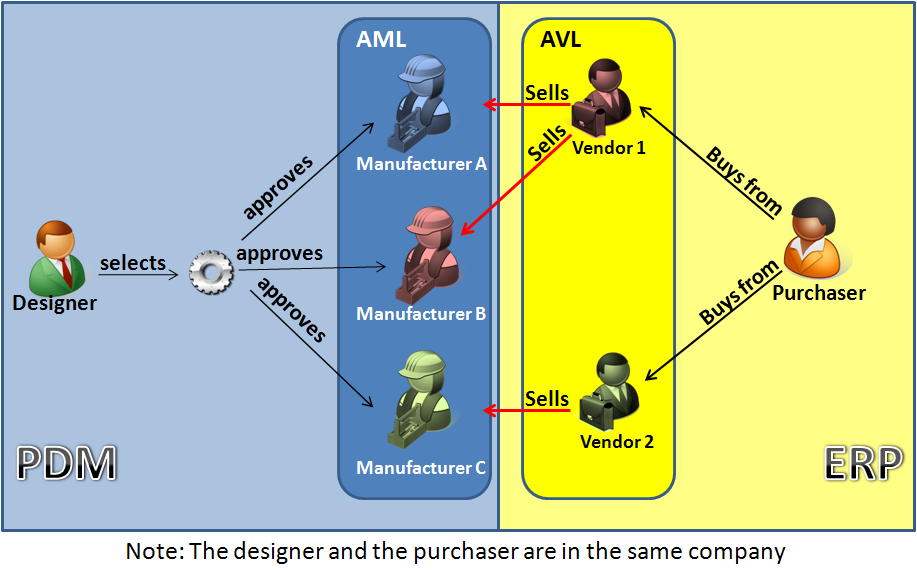
The characteristic of a standard purchase item is that it has been designed and developed by external companies and that these items can be found in catalogs produced my one or more manufacturers around the world, based on defined standard. For example a M12 Nut, a bearing with specific diameter and performance characteristics. The company that uses these standard parts creates an own definition of the part and makes references to manufacturers who provide these parts in the right quality and standard. These manufacturers appear on the Approved Manufacturer List (AML), which is an engineering task inside PLM to define this list.
In addition, based on this approved manufacturer list, the purchasing department will allocate vendors for these parts and based on vendor performance and reliability, they create a List of Approved Vendors (AVL)for these parts. This is a execution task to be defined in the ERP system.
So in day to day operation, engineering will define new standard purchase items if not available and this request will lead into an AML and then in ERP towards a AVL of the standard item. It is a combined activity where each of the disciplines has participate. For existing standard items, there is also a process triggered from ERP that influences their usage. For example a certain manufacturer might stop producing a certain item and this affects the AVL – purchasing raises a flag that the item becomes hard to acquire or even unavailable, which leads to engineering to define a new AML, which might end up in an engineering change as by changing some of the product functionality other standard items can be used to replaced the original defined item.
So for standard purchase items we see:
- new standard items are introduced through PLM – starting from AML into ERP with the AVL.
Both system add information to the item information - exiting standard item can become obsolete through PLM – as the company decides not to use them (anymore) or become phase out or obsolete based on a trigger coming from the ERP side, as the AVL has changed.
- Standard purchase items do not have revisions
 Items
Items
With items here we mean the non-standard purchase items, which can be divided again in two major groups:
- company standard items
- project specific items
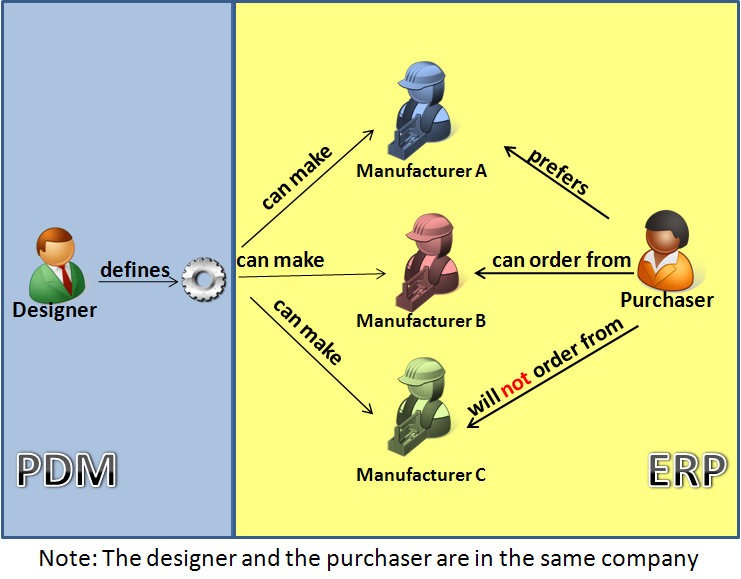
Project specific items are items defined by engineering during the definition of a product. These items need to be manufactured specifically for this product based on the specification provided by engineering. Outside the project these items are not used again anymore as they are too specific.
However companies try to standardize even their project specific items, in order to share and reuse them in other products. At this stage, the project specific item becomes a company standard item and is managed to be reused.
Both company and project specific items can have revisions as their maturity may grow. As long as the new definition complies to the Form-Fit-Function rules, the new revision of the defined item can replace previous revisions, meanwhile better support future usage.
So for items we see:
- project specific items are introduced through PLM and on the moment of production pushed to ERP to be manufactured according the design specification with the right revision
- company standard items are introduced through PLM and can be produced on stock (if there is a wide usage through various products) or pushed to ERP when needed to be manufactured according the design specification with the right revision
- Items are revision managed and follow the Form-Fit-Function rules
The conclusion of the above for this post is:
- Items have a common usage in both PLM and ERP
- Items are initially created in PLM and at a certain time transferred to ERP to be completed with logistical information
- Item usage can change based on availability triggers from ERP or use cases in PLM
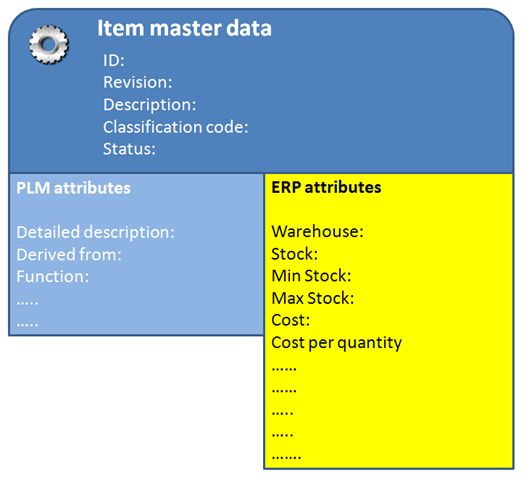
- an item is a hybrid entity – with a common shared identification, PLM relevant data and ERP relevant data
- Some of the ERP data might be relevant for information to be viewed the engineer and the other way around
Once agreed on the above concept, we have the guidelines how to connect items between an PLM system and an ERP system. In my next post I will talk more about that, also about how to connect BOMs between PLM and ERP.
Subscribe to this blog if you want to follow this sequential on how PLM and ERP connect and work together Subscribe in a reader
 Jos Voskuil's Weblog


[…] (The following post from PLM Green Global Alliance cofounder Jos Voskuil first appeared in his European PLM-focused blog HERE.) […]
[…] recent discussions in the PLM ecosystem, including PSC Transition Technologies (EcoPLM), CIMPA PLM services (LCA), and the Design for…
Jos, all interesting and relevant. There are additional elements to be mentioned and Ontologies seem to be one of the…
Jos, as usual, you've provided a buffet of "food for thought". Where do you see AI being trained by a…
Hi Jos. Thanks for getting back to posting! Is is an interesting and ongoing struggle, federation vs one vendor approach.…