observation This week was a week full of discussion with customers and VARs (Value Added Resellers) around PLM, PDM and implementation approaches and I will come back on this topic in an upcoming post. First I want to conclude the sequel on reasons why companies believe they should not implement PLM.

The 5 reasons not to implement PLM I heard the most were:

  1. The costs for a PLM implementation are too high
  2. A PLM implementation takes too long
  3. We already have an ERP system
  4. Isn’t PLM the same as managing CAD files ?
  5. We are so busy, there is no time to have a PLM implementation in our company

And now, we reached #4

4. Isn’t PLM the same as managing CAD files ?

As most of our customers do not have the time to study all the acronyms that exist in our business, it is understandable that it leads to a different interpretation as expected. In non-academic language I will roughly outline the differences.

In the eighties when most of the mid-market companies designed their products in 2D, bigger enterprises were investing in 3D CAD. In parallel these companies were working on concepts to manage all their engineering data in a central place.EDM (Engineering Data Management) was the word in fashion that time. We have to realize that networks were not as affordable as nowadays and that there was no Internet. It was the first concept to centralize and manage engineering data (files – no paper drawings). An EDM system was of course a system purely for the engineering department.

More and more companies started to expand the scope of data managed, it became the central place to store product related information plus being an infrastructure to collaborate on product data. The acronyms PDM (Product Data Management) and cPDM (collaborative Product Data Management) became in fashion in the nineties. A PDM system still focuses on the engineering department but no multi-discipline and if available in dispersed locations.

In 2000 the focus of PDM was again expanded to other departments in the company working on the product in different lifecycle stages. Instead of a static data management environment, it became a target to connect all departments working on the product through its lifecycle. By having all departments connected, the focus could switch to the process. The acronym PLM (Product Lifecycle Management) was introduced and this created a lot more areas of interest:

  • connecting the bidding phase and concept phase with feedback from production and the field.
  • bringing the sourcing of parts and suppliers forward in the product lifecycle
  • testing and planning on a virtual product
  • and more

But what should be clear from the scope of PLM compared to PDM and EDM, that it has become a cross-departmental approach and not only a system to enhance the way engineering departments work.

PLM is a strategic approach to enable innovation, better portfolio management and response to the market. The focus is on changing the traditional way of working into an approach where the process is as lean as possible still providing flexibility to adapt to global changes – changing customer demands, changing business situations.

Overview

EDM Focus mainly on centralizing mechanical design data
in an engineering department – mainly files
PDM Focus mainly on centralizing product related data in an engineering department – files, BOMs, etc
PLM Focus on the product development lifecycle cross departments and locations – files, BOMs, processes, resources.

Conclusion

No, it is not the same, where managing CAD files is mainly an engineering department related activity which can be solved by a product, PLM is a cross organization approach which requires a PLM system as enabler to implement various best practices

This time a short post, I am off to the ECCAP (September 9-10) to meet customers, implementers and peers all around ENOVIA

Adiosu

eccap

observationThis time a short post. When I committed myself to write posts about connecting PLM and ERP, I already touched several times the PLM and ERP vision (from the point of view of a PLM missioner of course)

Just as a reminder the 5 most objections I heard the most from companies when discussing a PLM implementation. You also will find references to the first two objections I already discussed.

The 5 reasons not to implement PLM I heard the most were:

  1. The costs for a PLM implementation are too high
  2. A PLM implementation takes too long
  3. We already have an ERP system
  4. Isn’t PLM the same as managing CAD files ?
  5. We are so busy, there is no time to have a PLM implementation in our company

3. We already have an ERP system.

From the analyst point of view, PLM has established itself as a discipline beside ERP and CRM. Which discipline requires the major focus in a company depends on the major business process of the company. It is clear PLM brings it benefits for manufacturing companies, where innovation and managing their product IP are major reasons for success.

Various publications on this topic (in order of relevance):

So by studying all the links in this post, you might come to the conclusion below:

Conclusion

All my previous posts and the above publications (and much more) explain that if a company is interested in managing their Intellectual Property (IP) – the reason why they really differentiate , plus if they want to remain in business by being innovative,PLM is the proven approach for this type op companies.

And tired of innovation, watch this:

sleepAfter two posts on objections for PLM, I want to come back to the basics around connecting PLM and ERP systems. Most of the people are enjoying their holiday at this moment and for that reason I have the time to complete the PLM and ERP story. I guess, for a company in the mid-market, it is hard to decide which approach to follow.

ERP vendors will claim that by managing items and relations to the design documents, they are able to provide an  environment that supports engineering on top of their system. For mid-market companies this might be the ‘cheapest’ option – buy or get your solution from a single vendor. Especially when the ERP vendor provides the PLM module for free. And this is exactly one of the reasons why it will fail. When no PLM knowledge or best practices are provided to the company, but just a set of function and features, how would these companies know how to implement PLM ?
If you give a module for free it obviously also shows you do not understand the value of it.

My two last posts with the common title 5 reasons not to implement PLM are addressing some of these issues.

But now back to the PLM and ERP connection. In my two previous posts, I described how would be shared between a PLM and an ERP system, combined with issues as: intelligent part-numbers and classification. You will find similar discussions on the manufacturing center.

The connection between PLM and ERP has little value in case only items are exchanged. Of course engineering can have the benefit of early visibility of item logistical data, like costs, stock and status. But the real value comes when engineering, through the PLM environment, feeds the ERP system with the definition of how to manufacture a product. The way to manufacture a product is based on the MBOM (Manufacturing Bill of Materials), combined with operations that need to be performed on the items in the BOM.

In my post Where is the MBOM I already discussed the classical challenge many companies are facing. Historically they enter all the data for manufacturing in their ERP system, as this was the first system driving production. The input for the ERP system came from the engineering department, sometimes provided as Excel sheet or in case of more automation with the CAD environment as an EBOM (Engineering Bill of Material)

As the concept of connection CAD through PLM with ERP might be new for many companies, I will describe below some ‘bad practices’ that I found in past implementations and what we can learn from them.

Bad practice 1: A CAD file equals and Item number

As PLM is often introduced starting from the design department, the initial thought to connect CAD files and Items is based on the simple rule: “Every CAD file represents an item number”. In the ‘good old’ 2D world this might have been true, as in the ERP system, related to each item to be manufactured a drawing existed.

However in the 3D world this approach leads to the following problems:

  • Flexible parts like rubber tubes or belts have a different file representations when used in a different position. This means for one item number several CAD files may exist.
  • Some CAD systems like CATIA, SolidWorks allow the designer to store within one file different configurations of a design, as they share a common design but vary on some specific points. Each variation of course is a different item number. This means for one CAD file several item numbers may exists.

The conclusion from the above exceptions is:

  • Handle CAD files and Item numbers as separate entities in your PLM system
  • A CAD file CAN NOT BE equal to an Item Number

Bad practice 2: The CAD structure can be used as the BOM to be send to ERP

As in many companies the EBOM and the MBOM resemble a lot, the temptation exists to push the engineer instead of defining a design in the concept of the EBOM, to work in a mixed environment.

This approach will lead to the following problems:

  • Drawing of non-design items in the 3D CAD assembly as they are needed to represent an item. For example a paint-can symbol, an oil-can, etc. As these materials are needed for manufacturing, the designer has to add them to the product structure as in this way they will appear in the BOM. This approach leads to a dependency on the CAD assembly that is not needed. Imagine another type of paint is needed – this would require the designer to change the CAD assembly files as they represent the manufacturing structure – or you do not update the CAD assembly files and in that case you have no reliable data anymore.
  • The designer might use in the design subassemblies that group two or more items logically together. For example a bolt, a nut and two rivets. As the subassembly does not exist as an item number in the ERP system, the ERP system treats this assembly as a phantom assembly. No operations needed, but an extra intermediate step is defined in the ERP system, as-if for each usage the bolt, the nut and rivets need to be assembled.

The conclusion from the above points is:

  • Handling the MBOM in the CAD system to send it automatically to ERP leads to complexity either in the design environment or in the ERP system
  • There is no need to have this complexity when the concept of EBOM and MBOM is implemented in PLM
  • Handling EBOM/MBOM transformation in the interface leads to costly complexity, see Where is the MBOM ?

Bad practice 3: The Items in CAD structure are tightly linked to the MBOM

This practice often appears in combination with the two bad practices above. As the company focuses on a resemblance of the CAD structure and the MBOM, people start to imagine also the other way around. They expect the PLM system to keep the CAD structure in-sync with the BOM. In case an item is deleted or replaced in the BOM, the CAD system should be updated automatically..

I guess this is one of the things I learned that is an utopia and probably not needed if a clear understanding of CAD structure, EBOM and MBOM exists. Removing or changing items in a BOM does not give enough information about the impact on the CAD structure. For example if one item appears 3 times in an assembly and one instance is replaced by another item, how would the CAD structure know which item should be replaced ?

The conclusion from the above point is:

  • changes in a product assembly can be initiated from the BOM but should be executed in the CAD system
  • Automatic synchronization of CAD structure based on BOM changes is an utopia

Conclusion

In general my conclusion is (after many years of trying to satisfy customers learning from the above points and more) :

In order to create a smooth connection between PLM and ERP you need:

  • Item creation in PLM – completion in ERP
  • ERP provides feedback on costs and availability
  • In case of production issues an ECR/ECO should be launched – going through PLM to assure engineering impact has been analyzed
  • PLM needs to manage the capture of the CAD structure towards the EBOM
  • EBOM/MBOM transformation needs to be done in PLM
  • The connection between PLM and ERP should go through the MBOM

observation   The past two weeks my main activities were mainly around the following two topics:

  • – how to implement PLM successfully ?
  • – how do you connect and position PLM and ERP ?

Meanwhile an interesting discussion developed on the manufacturing forum around intelligent part numbers. Check it out if you want to learn more on that topic. In my next post, I will continue in de sequence of How to connect PLM and ERP, as there are many other topics to discuss.

This post, I will continue with the 5 reasons for companies not to implement PLM. An interesting report related to this topic was written by the Aberdeen Group: The Best Kept Secret of Top SMB Product Developers – Finding the Shortest Path to PLM Value. One of the interesting points raised here was, the comparison of major PLM characteristics and how they were perceived by companies that had implemented PLM and the companies that were thinking of implementing PLM.

Three observations from this interesting report were:

  • 54 % of the companies that have not implemented PLM yet, consider costs as a major factor, where from the companies that have implemented only 32 % mentions costs as a major factor. This also supports the arguments I gave in my previous post, that a PLM implementation should not be considered on its costs.
  • 39 % of the companies that have implemented PLM consider the implementation process as an important factor, where only 11 % of companies that have not implemented PLM perceive this as an important factor.
  • 35 % of the companies that have implemented PLM realized that adapting their processes to support PLM is an important factor, where only 11 % of the companies that have not implemented PLM consider this important.The two last points I will use in my observations below, where I will discuss why a PLM implementation takes too long.

As a reminder the 5 objections why not to implement PLM  were:

  1. The costs to implement PLM are too high
  2. A PLM implementation takes too long (below)
  3. We already have an ERP system
  4. Isn’t PLM the same as managing CAD files
  5. We are so busy, there is not time to have a PLM implementation in our company


2. A PLM implementation takes too long

When you hear experiences about PLM implementations, you might conclude that indeed the perception that PLM implementations take too long might be right. However, I believe it depends what where your initial expectations when you talk about too long.

The first misconception is probably that you can install PLM like a (complex) product. Companies usually have their previous ERP implementation in mind as benchmark. This creates the expectation that once installing the PLM product, you need to configure the right parameters according to the major business processes, test the environment, train the people and start working. So the company together with the implementing partner starts to build a project plan and after 6-8 months the system should be up and running. And than the problems start …….

PLM is not a product, it is a vision where a company targets to capture, manage and use its Product Knowledge (IP) in such a way that is improves the overall business. Not only during the development phase, but also during the early concept phase, during production planning, production and even after sales / service.

This requires all companies to reconsider the way they work in order to adapt their processes to a PLM aligned overall business process. And changing processes involves people and the way they work. And I guess most of us understand that changes in an organization go slowly. I wrote several posts on this topic and you can find much more on the web.

PLM is not a product install, it is a vision implemented around a PLM system !

The mistake companies make is that they believe with one installation they can implement PLM in their company. Like they did with the ERP system or CRM system. However PLM requires a different way of working and this is underestimated by companies. That is why (numbers from the Aberdeen report):

39 % of the companies that have implemented PLM consider the implementation process as an important factor, where only 11 % of companies that have not implemented PLM perceive this as an important factor.
35 % of the companies that have implemented PLM realized that adapting their processes to support PLM is an important factor, where only 11 % of the companies that have not implemented PLM consider this important.


Companies that have implemented PLM realized that the implementation process was much more important to them then the costs (39 % against 32 %). The implementation process, the way and order in which PLM functionally is implemented, is something that might become more standardized in the future.

As PLM for the mid-market is an emerging market, PLM vendors will need to focus on this area. Not only product packaging but also in predefined implementation process templates to provide realistic expectations about the implementation process. A phased approach, for sure as described in my previous post, should be part of the discussion. In general you can say, a basic PLM implementation spans over 2 to 3 years in situations where companies start from scratch. However this does not mean there is all the time activity – sometimes there is just a phase of learning and understanding the current (new) situation after a step executed.

Related to the implementation process you have also the implementation of PLM Best Practices. These best practices also become more and more available for mid-market companies. ENOVIA SmarTeam provides with its express offerings different entry PLM best practices, to be extended in the future, as beside Design and Engineering, many other best practices exist, for example bidding, supplier collaboration, manufacturing planning and more.

PLM vendors will provide PLM Best Practices in the future, still the order of implementation and the adaptation of PLM best practices by a company are different for every company. That is what companies realized that have implemented PLM . Adapting the company’s business processes to support PLM best practice has become a more important topic then the cost (35 % against 32 %).  And adapting company business processes is merely an organizational change, which needs to go in the pace that a company can digest.

The fact that companies underestimate the process related issues compared to the overestimation of costs (11 % against 54 %) shows the misconception in the market around PLM. Combined with the perception that a PLM implementation has a fixed time limit these are the reasons why companies believe a PLM implementation takes too long.

Conclusion: As a PLM implementation is a change and improvement process for the company, it is not possible to assign a time limit. There is always time to improve – a judgement between investment and ROI but continuous.

observation Last week I conducted another ENOVIA SmarTeam Express training, this time in the Coventry office from Dassault Systems. The conclusion from the audience was that the SmarTeam Engineering Express concept is a perfect entry PLM system for the mid-market. It show the general best practices of PLM for a mid-market from concept to manufacturing. Additionally is provides the company a flexible PLM platform to further grow and expand to directions that bring more benefits.

But here I want to stop, as you will start to believe it is a marketing speech. In a certain way it is marketing. Marketing is needed to influence people and companies to change their way of thinking. Without marketing we would never buy Personal Computers, mobile phones, MP3 players, certain drinks and more. We tend to forget why we need certain products and what the real benefits are. PLM is not at that level of market understanding yet.

For that reason I will give the 5 objections why not to implement PLM that I heard the most and comment on them.

The 5 reasons not to implement PLM I heard the most were:

  1. The costs for a PLM implementation are too high
  2. A PLM implementation takes too long
  3. We already have an ERP system
  4. Isn’t PLM the same as managing CAD files ?
  5. We are so busy, there is no time to have a PLM implementation in our company

In this post I will address the first reason. Others in upcoming posts.
Note: I use generalizations in this post as specific cases my vary – specially when talking about comparisons with ERP system.

1. The cost for a PLM implementation are too high.

This is the argument I heard the most. And indeed, if you accumulate the total costs of a PLM implementation after 2-3 years, you might get that impression. The main reason for this perception is the fact that often companies have suffered from an ERP implementation in the past. I do not want to blame the ERP companies for the high costs of implementation, as they were the first major business system implemented in manufacturing companies. There were many horror stories in the past, but now you can say ERP has become mature and processes to implement are clear too. For that reason ERP companies now can provide an estimated cost and ROI (Return On Investment) for manufacturing companies. I guess that manufacturing companies that have not invested in ERP the past 20 years, probably stopped to exists, so benefits for ERP are clear.

But at what costs ? PLM is not as mature as ERP. This means a PLM vendor cannot come to a manufacturing company, identify its main business process and apply a PLM template. The major reason for that is the fact that the PLM vision encompasses many different processes in a company, many of them currently not even identified in mid-market companies. This leads to the situation where PLM implementers together with their customers spend time to learn and pay the price for learning. Most of the learning has been done already by the big enterprises, now the mid-market companies need to understand what is relevant for them.

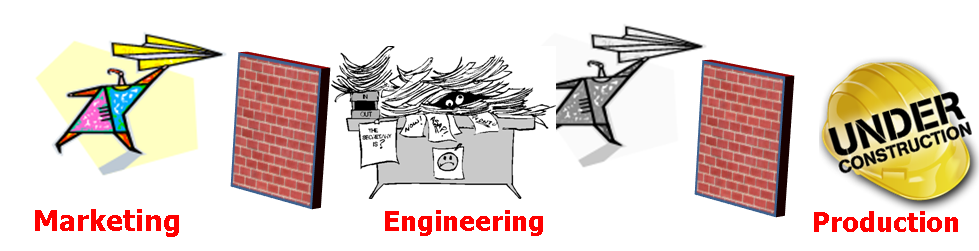
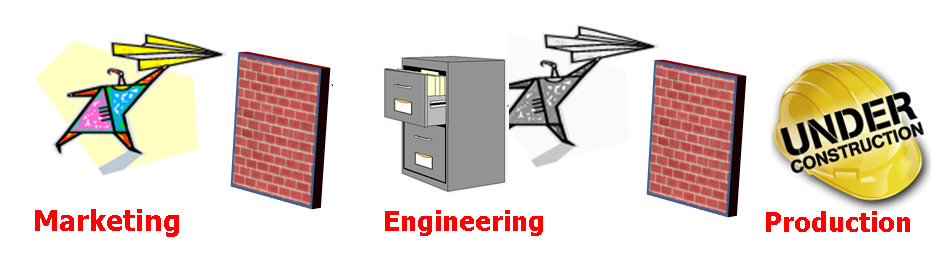
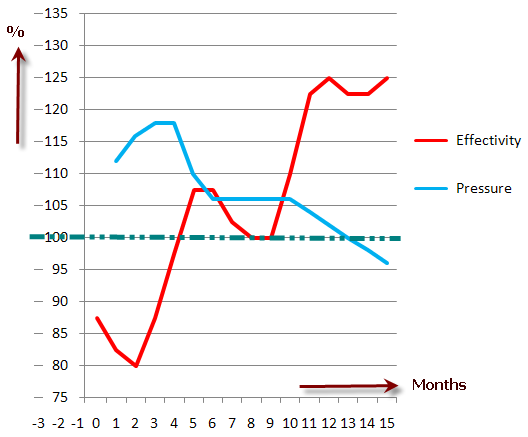
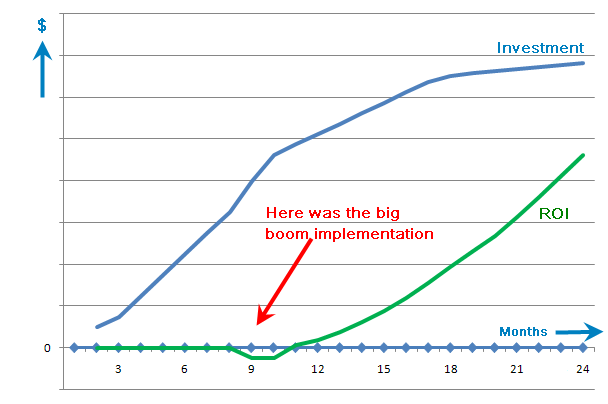
We know learning has it costs, and specially when external (paid) resources are involved, the costs might add up too high. In parallel the biggest mistake made to implement PLM is to consider it the same way ERP is implemented. A project team builds in a isolated environment a new ‘to be’ PLM environment, once and a while involving key users for their feedback. Then after 8 months – 1 year they role out the PLM implementation to the users as a ‘big boom’. As a logical reaction the users object to this radical change, which leads to compromises, and rework of some of the project deliverables. At the end after 2 years the company might have an acceptable PLM implementation, meanwhile having a bad taste of a failed and costly project. And the ROI still to come……

See the diagram below:

big boom

So how can we avoid these high costs ?

First of all the investment of a PLM is done because we believe there is a Return On Investment. Companies invest in order to improve their competitiveness and PLM is a main driver for manufacturing companies. So how can we assure ROI and lower the total costs ?

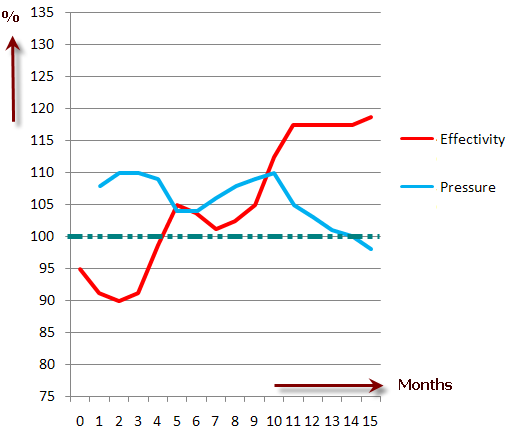
A first best practice is the phase a PLM implementation into small, digestible steps with a durations of 3 to 6 months. Each step will have its investment and its limited scope. The result will be that even after the first step, people can start working with the new system, experience the impact of the new PLM system and start bringing ROI as the benefits will start paying of.

These benefits plus the fact that the company and their users start to understand what a PLM system can bring for them and this leads to a clearer and lower cost of implementation for the next phases. The figure below gives an impression of how costs and ROI will work out in this situation.

phased implementation

The Express offerings from ENOVIA, SDE (SmarTeam Design Express) and SNE (SmarTeam Engineering Express) are exactly targeting this approach. Instead of imagining what PDM and PLM could do for a company. They allow the company to quickly start and experience and later grow to the optimized environment.

The management of the company should always keep their ultimate PLM vision in mind, still anticipating changes as business evolves. Each implementation phase should fit in the ultimate PLM vision and its implementation should be judged on bring ROI.

This is a main difference between PLM and ERP. An ERP implementation focuses on a specific logistical process to implement. This implementation cannot be done for 50 % and than later another 30 % and again another 10 % till the ultimate ERP vision has been reached. It must be done in one implementation as it targets the whole production process.

A PLM implementation however is an implementation of Best Practices all around Product IP and innovation. The world in which products are defined has changed drastically due to globalization, customer focus and changed technologies. This means that the way companies define and develop their products have to be flexible and changeable. PLM implementations require a step by step approach, every time improving those areas that bring the best ROI. Still the company needs to remain flexible in to anticipate for future changes, merges, acquisitions or even different business processes.

Conclusion: PLM systems are not costly in case of a phased implementation targeting immediate ROI per phase and flexibility in the future.

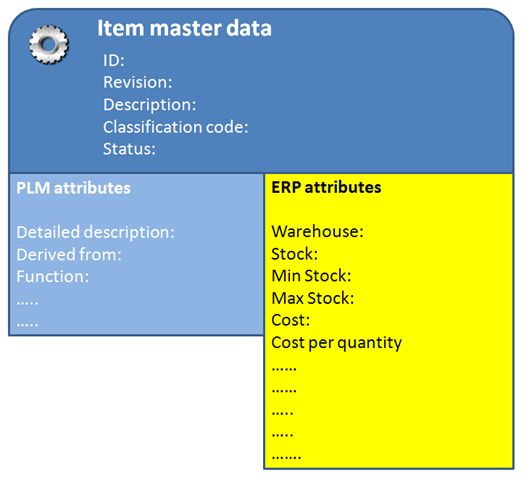
sleepIn the previous post, I described that the item is the primary entity used in the connection between a PLM system and an ERP system. The initial definition comes from the engineering department, defining the main characteristics of the item, like ID (part number), Description and Classification Data for engineering usage.

Next when the item reaches a certain maturity stage, that it will be purchased or produced, the initial definition needs to be transferred to the ERP system and to be completed in ERP with logistical data. Often as part of the classification data, the engineer has already defined what type of item it will be. This information can be used in ERP to apply default data based on a certain template item or derived-from item.item_id

 
Item identification / Part Number

Most of the manufacturing companies are using so called ‘intelligent’ part numbers to identify their items. This was done for historical reasons. As there was no IT system in the company, the part number contained logic and information in order to ‘immediately’ understand its usage.

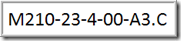
For example M210-23-4-00-A3.C tells me immediately it is a manufactured part, first time used in the milling product line (210) and it is used for hydraulic (23), not in stock (4), a preferred item for engineering (00) and its definition can be found on the drawing with the same name, size A3 revision C.

If you did not understand this directly from the number, it does not mean you are not intelligent, although it is an intelligent part number. This shows that intelligent numbers are useful when people are trained and have a good memory. For everyone else in the company (and joining the company later) the number is initially the same as a meaningless number.

For that reason is is recommended to use ‘non-intelligent’ numbers to identify parts. This creates no overhead for people to learn all kind of intelligent numbering mechanisms and it pushes everyone to look to additional information which can be understood immediately, like the description or classification data. We have now IT systems like a PLM or ERP system that allows us to display more than a number.

For backwards tractability of course beside the new meaningless part number, there can be also a place holder in the IT system to define what the origin of the part was (with the intelligent part number). Specially when companies merge this will happen. The same part exists in different numbering schemes in each company. The only way to solve this is to add a new identifier, preferred to be the ‘non-intelligent’ number.

Conclusion: For part numbers it is recommended to use non-intelligent numbers based on a sequence, avoiding the creation of legacy information (merge) or training to understand the items by number.

Now the new created part has a meaningless identifier, we have achieved two things:

  • The PLM and ERP system have unique key to share. Identifying this number with its revision (if relevant) immediately makes it clear for both the PLM and ERP system which part is meant.
  • To understand what the item really does, we need to understand additional information like its description

Note

: Not all ERP systems support revisions of items. Some work always with the actual version of the item. Where PLM systems trace and keep the exact definition of an item, often ERP systems trace the item by effectivity. You need to know what was the engineering definition, when the item was manufactured.

desc


Description / Classification

Initially when an item is defined the engineer might create a description, like HYDRAULIC CLAMP without any further details. Some years later there might be 10 or more hydraulic clamps in the system, where some of them might be identical and others differ. However the description HYDRAULIC CLAMP might be sufficient for a part list to be shipped to a customer (we do not want the customer to know the exact item characteristics in order to have him order the spare parts through us).

Often on the engineering side an additional description field is added, which is a detailed description. This description is used internally and should be standardized in order to support the engineer to select the right item.

So HYDRAULIC CLAMP could have an internal definition HYDRAULIC CLAMP 400-600 describing its usage. This detailed description should be either enforced and generated by the PLM or should be handled through a librarian or standardization role in engineering. This should be combined with a classification of the new item. The advantage of a detailed description and classification is two-fold:

  1. It supports engineers to search for existing items – so reuse is more likely. Often the description in the ERP system was not built in this way and for that reason engineers re-invent items while they might exist.
  2. The classification will alert the engineer or librarian that an item with the same classification characteristics already exists. This means it might be identical or an additional classification characteristic is needed to differentiate the two items.

The definition of a new item would go through the following steps:

  • The engineer defines the description and can work with the item in a temporary mode as he is not sure of using the new item in this way
  • The item becomes mature and he needs to generate the detailed description.
  • At this stage the librarian or a standardization committee might come in, to analyze the need for the new item. And if so to define all its classification data, knowing it is a new and unique item needed.
  • Once the engineering definition is completed, the item definition can be send to the ERP system in order to complete it with logistical data – who can manufacture it and tens of attributes more. The item still is not released
  • A hand-shake from the ERP system will confirm that the item definition is completed and as part of the release process the item can be approved for manufacturing. In case no pre-production stage exists it might be released even.

new item defintion

Conclusion: Standard Description, Detailed Description and Classification information is done on the PLM side to support reuse of items and to avoid creation of similar items with a different part number. The ERP systems uses the description definition and completes the definition with ERP required information. Data relevant for the engineering is synchronized back once the full definition is available.

The next post in this sequence will be discussing the BOM transfer to ERP

Last week in Israel someone told me he appreciated some of my posts and while reading other posts, he felt asleep as they were too much dry PLM basics. And I guess that is correct.

Sometimes the post is about sharing observations, thoughts around PLM, easy to digest, hoping to create a thought process. Others are trying to assist companies/people  to teach the principles of PLM, as PLM still has a way to go in order to be positioned correctly in companies using various other systems, like CAD data management, Project Management, ERP, CRM and more.

So to avoid people falling asleep during reading one of my posts, i will put a warning sign in the beginning.

observation
Observation
Post containing observations will be preceded by the icon on the left
sleep
Teaching
Post containing theoretical explanation will be preceded by the icon on left

So depending on the time of day and where you are: select the right post to achieve your goals

This week I was in South-Africa working with Aerosud, one of the prominent companies in the Aerospace industry in South Africa, working with the major OEM’s One of the topics discussed in the workshop with Aerosud was the connection between PLM and ERP. As this is a question that occurs so often, see also previous posts, I will address in this post and the upcoming posts the logical steps for an PLM – ERP integration and issues a company might face.

For some people I guess the big surprise will be that most of the difficulties and discussions are not on the technical level, but on how a company has organized their data and organizes their data in the future.

The first rule for implementation is:
The PLM system manages all product related IP (Intellectual Property) and the ERP system manages the executing in the most effective way, taking into account resources, time, material scrap etc often linked with financial transactions

Although some ERP vendors might want you to believe they offer also PLM functionality in their system, it is always a small subset of the total PLM capabilities. Linking manufacturing documents to an item is not PLM. PLM is managing all product related IP and this requires connections to all information sources during the whole product lifecycle, not only during manufacturing.

So if we agree on the above, we understand there is a need to connect PLM and ERP, as both systems have a vital task in a manufacturing company and both work around common information, the product, composed of all its physical items.

Items The Item

The physical item, is the shared and understandable entity understood through the whole company. Some companies call their items parts. In order not to confuse between an item and a part designed in the CAD system, i will talk about items, when I mean the physical representation.

Items can be a single item, a rivet, a specific metal plate or it can be a complete product or smaller component of a complete product. They have one thing in common, we all identify them with a unique number the item number.

In engineering oriented companies you might hear designers say, the item number is equal to the part number of the part or product they are designing, as often in their case what they design on the lowest level of the assemblies, becomes an item.

In general you can subdivide the items in two major groups:

  • standard purchase items
  • company or project specific items.

 Standard Purchase Item Standard purchase items

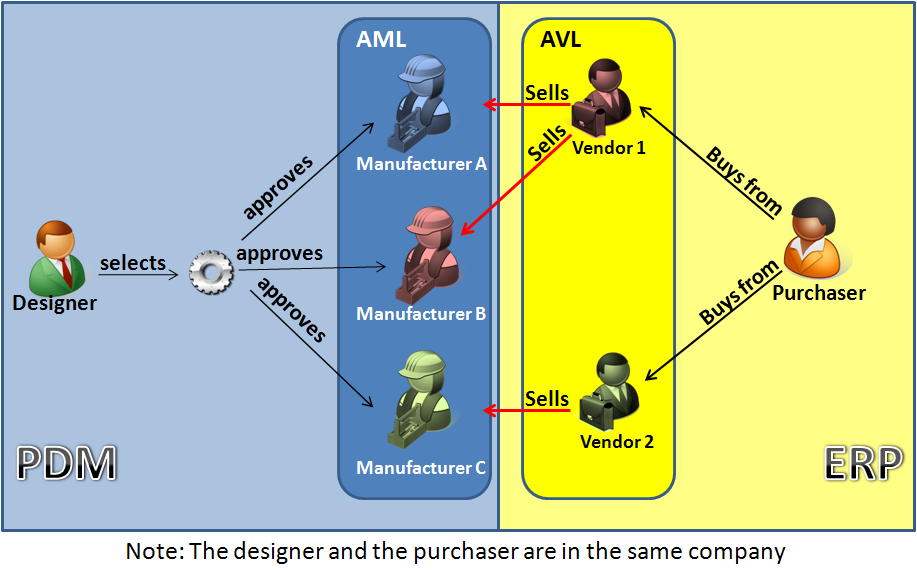
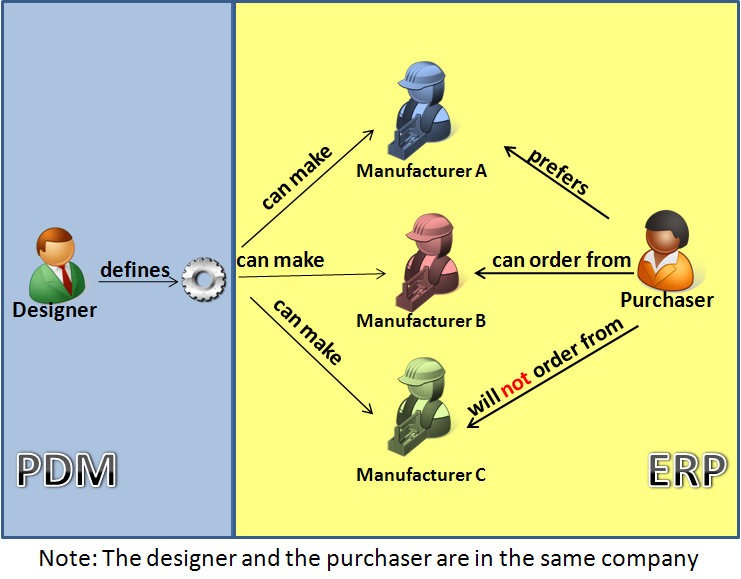
The characteristic of a standard purchase item is that it has been designed and developed by external companies and that these items can be found in catalogs produced my one or more manufacturers around the world, based on defined standard. For example a M12 Nut, a bearing with specific diameter and performance characteristics. The company that uses these standard parts creates an own definition of the part and makes references to manufacturers who provide these parts in the right quality and standard. These manufacturers appear on the Approved Manufacturer List (AML), which is an engineering task inside PLM to define this list.

In addition, based on this approved manufacturer list, the purchasing department will allocate vendors for these parts and based on vendor performance and reliability, they create a List of Approved Vendors (AVL)for these parts. This is a execution task to be defined in the ERP system.

So in day to day operation, engineering will define new standard purchase items if not available and this request will lead into an AML and then in ERP towards a AVL of the standard item. It is a combined activity where each of the disciplines has participate. For existing standard items, there is also a process triggered from ERP that influences their usage. For example a certain manufacturer might stop producing a certain item and this affects the AVL – purchasing raises a flag that the item becomes hard to acquire or even unavailable, which leads to engineering to define a new AML, which might end up in an engineering change as by changing some of the product functionality other standard items can be used to replaced the original defined item.

So for standard purchase items we see:

  • new standard items are introduced through PLM – starting from AML into ERP with the AVL.
    Both system add information to the item information
  • exiting standard item can become obsolete through PLM – as the company decides not to use them (anymore) or become phase out or obsolete based on a trigger coming from the ERP side, as the AVL has changed.
  • Standard purchase items do not have revisions


Item Items

With items here we mean the non-standard purchase items, which can be divided again in two major groups:

  • company standard items
  • project specific items

Project specific items are items defined by engineering during the definition of a product. These items need to be manufactured specifically for this product based on the specification provided by engineering. Outside the project these items are not used again anymore as they are too specific.

However companies try to standardize even their project specific items, in order to share and reuse them in other products. At this stage, the project specific item becomes a company standard item and is managed to be reused.

Both company and project specific items can have revisions as their maturity may grow. As long as the new definition complies to the Form-Fit-Function rules, the new revision of the defined item can replace previous revisions, meanwhile better support future usage.

So for items we see:

  • project specific items are introduced through PLM and on the moment of production pushed to ERP to be manufactured according the design specification with the right revision
  • company standard items are introduced through PLM and can be produced on stock (if there is a wide usage through various products) or pushed to ERP when needed to be manufactured according the design specification with the right revision
  • Items are revision managed and follow the Form-Fit-Function rules

The conclusion of the above for this post is:

  • Items have a common usage in both PLM and ERP
  • Items are initially created in PLM and at a certain time transferred to ERP to be completed with logistical information
  • Item usage can change based on availability triggers from ERP or use cases in PLM
  • an item is a hybrid entity – with a common shared identification, PLM relevant data and ERP relevant data
  • Some of the ERP data might be relevant for information to be viewed the engineer and the other way around

image

Once agreed on the above concept, we have the guidelines how to connect items between an PLM system and an ERP system.  In my next post I will talk more about that, also about how to connect BOMs between PLM and ERP.

Subscribe to this blog if you want to follow this sequential on how PLM and ERP connect and work together
Subscribe in a reader

Last week I was in Greece together with the Dassault Systems Value Added Reseller OVision. Everyone would expect from the first sentence I was on holiday. Yes I agree, the settings were holiday like always temperatures above 35 C (approx 100 F) and never far from the see.


However,……

….we were visiting ENOVIA SmarTeam prospects and discussed existing customer specific implementation wearing business suits – not wearing shorts. However the most interesting issue was, that we were working with companies that were in the early stages of data management.

image If you look around the world, to my understanding, and would rank countries on PLM awareness and need for data management, I would rank Western Europe, Scandinavia, Japan as the countries where concepts for PLM are understood, although in many mid-market companies I would still expect on the long term a culture change to real PLM. In my previous posts, I addressed several thoughts on that.

North America and the United Kingdom I rank differently, as somehow, there are big PLM implementations, but the majority of mid-sized companies is supplier of an OEM network or sees no return on investment on a PLM implementation

Then I would rank countries like Turkey, South Africa, India, and China as the next level. As they participate in manufacturing of global companies – mainly automotive and aerospace, they are driven into the basic needs of PDM as requirement from the OEMs. This pushes in parallel the country’s infrastructure – Internet / Intranet availability.

At the fourth position, I would rank a country like Greece. As due to the local economy there is not a focus on manufacturing or a huge participation in a global supply chain, they have to introduce their data management, growing to PDM or PLM slowly on a still developing infrastructure

Disclaimer: Countries not mentioned here can fall in any of the above categories (or even below). The fact that I did not mention them, is because I have not enough experience working with these countries to judge.

Back to Greece 

Apparently, due to all the beautiful islands in Greece, there are thousands of ferries traveling from island to island or other Mediterranean destinations. For that reason, there are companies that build ships, companies that refurbish ships and companies that maintain ships.

At the end, a ferryboat can be seen like single process plant. Like in a plant, you have equipment that needs to be operational and maintained during operation.

This requires a well-defined form of data management, often driven by quality processes around ISO 900x.

Companies often consider quality processes as a kind of document management. You have your manuals with procedures, templates spread around the company, and you update them before the next audit. Everyone is supposed to follow the procedures and supposed to know the latest procedures.

This is a labor-intensive activity if you want to execute as best as possible. In companies where the cost of labor is an issue, you will see that most people are loaded with work and usually the quality issue is the last activity these people will execute, first the operational issues then the rest.

image

In order to improve the quality of the information, document management and workflow processes are functionalities used to address the availability of the documents and the workflow ensures information to be pushed and published in a guaranteed manner.

Instead of pushing the information to all the users, the company is now able to centralize the data and users can pull the latest information from the system. The workflow processes and the document management system guarantee the right steps are followed and you are always looking to the latest versions. Also you are aware of on-going changes.

When it comes to ships however, there is more to address than ISO documentation and procedures. The ship itself has maintenance or refurbishing projects running on certain systems or locations in the ship. Here the advantages of a PDM system like ENOVIA SmarTeam appear. In the ENOVIA SmarTeam data model you are able to manage information (CAD documents and Bills or Materials too) related to a project, to a ship, to a location or system in the specific ship. There is no need for keywords on the document to describe where it applies, or have copies from a document because if applier to several ships. The data model below shows the types of information that can be stored around a ship.

image

Once the company has the vision, what to achieve in the upcoming years, a roadmap can be defined. Keeping user understanding, flexibility but still a continued move towards the PDM data model are parameters for the management to monitor and drive. Companies that build or refurbish ships of course have even higher needs to integrate their engineering activities with the ships maintenance data. This avoids a costly hand-over of data that already could be available in the right format.

Conclusion: Although Greece is in the fourth rank of PLM needs and awareness, the benefits to gain from PLM are there too, however due to awareness and infrastructure, they are not as visible as in the countries ranked as number one.

As Greece is the birthplace of many sciences, I am sure the awareness for where to apply PLM concepts is for sure something they will achieve.

This week was again a week with several customer visits and discussions around PLM implementations. As analysts like CIMdata, AMR Research, the Aberdeen group are all claiming that PLM will be the next thing for small and medium manufacturing companies, the discussion around PLM is ongoing. Of course, PLM vendors are adapting their messaging and sometimes their products towards the SMB.

Some vendors like PTC and UGS try to downscale their existing products mainly by changing the packaging of the product (but it remains a PLM system originally designed for enterprises) others like Dassault Systemes have a special SMB offering with full PLM capabilities, ENOVIA SmarTeam.

But let’s assume we have the ideal PLM solution for an SMB company. This was the start point, I had during my meetings this week.  How would you motivate a company to implement PLM, knowing all the constraints of SMB companies? Miki Lumnitz wrote about it in his blog –PLM for SMB who are those companies?

I noticed one of the main issues for discussion is the handling of the MBOM (Manufacturing BOM). So let’s look at the different viewpoints in a company.

EBOM (Engineering Bill Of Materials)

 “The EBOM reflects the way a product was functionally designed”

When engineers define a product, they design (or reuse) assemblies (modules) and add new parts and assemblies to the design. When working with a 3D CAD system, saving the product results in a document structure that resembles a lot the engineering BOM. Traditionally companies got the impression that by changing this EBOM structure a little, they would have a structure ready for manufacturing, called the MBOM.

MBOM (Manufacturing Bill of Materials)

“The MBOM reflects the way a product will be manufactured”

The MBOM is a structure derived from the EBOM. The main changes from EBOM to MBOM are:image

  • removal of subassemblies that do not exist in the physical world. For example a grouping of two parts that are logically grouped by the designer, but as a group does not make sense for manufacturing (Assembly B).
  • And in addition to non-design items which are needed for manufacturing the product. For example paint or grease. (Item F)

Traditionally – and also in the companies I was visiting – the EBOM is the domain for the engineering department and with additional modifications, they provide a BOM (is it EBOM or MBOM ?) to the ERP system.  Some companies add non-engineering items to their design – they draw a can of paint in their design to make sure the paint is part of the BOM. Some work with phantom production order to address the usage of subassemblies by engineering.

image

Both EBOM and MBOM definitions are preparations before production can start. The EBOM and MBOM contain the product knowledge, how to build and how to manufacture a product. For that reason, they should be handled in the PLM system. The main reasons for that are:

  • during process engineering, there is a need to use, analyze and sometimes adapt engineering data. This can be done in the most efficient way within one system where all product data is available
  • PLM systems, like ENOVIA SmarTeam, contain tools to create quickly based on certain rules an MBOM derived from the EBOM and when changes occur even compare both structures again, to adapt to these changes
  • Having a single environment for product definition and manufacturing improves the total product understanding

So where is the MBOM?

Ask yourself as a company ” where do I handle the MBOM ?”  Some of you might say, we do not have an MBOM as our EBOM with some modifications is already good enough for manufacturing.  Many companies might say, we manage the MBOM in the ERP system as this is (was) the only system we had where we could define such structures. These companies are candidates for improving their Concept to Manufacturing process, as for sure either users or working methods are compromised to work with the MBOM in the ERP system.

image

Some might says: Do we still need ERP systems?

Yes, as ERP systems are built to schedule and execute the production of well-defined products in the most efficient way. ERP systems are needed for the execution, often the core activity for manufacturing systems.

PLM systems are the reason that ERP systems can execute, they bring the product definition and information to produce a product. And in case the company designs and manufactures excellent and innovative products the future is bright.

But we should not consider engineering activities in the same way as production activities.

Einstein once said (and he is not an expert anyway):

Innovation is not the product of logical thought, even though the final product is tied to a logical structure

I am curious to learn where you manage your MBOM

Translate

  1. Unknown's avatar
  2. Håkan Kårdén's avatar

    Jos, all interesting and relevant. There are additional elements to be mentioned and Ontologies seem to be one of the…

  3. Lewis Kennebrew's avatar

    Jos, as usual, you've provided a buffet of "food for thought". Where do you see AI being trained by a…

  4. Håkan Kårdén's avatar